Introduction
An introduction to an introduction. Part of engineering is a classic no-right-answer debate about how much time you should spend investing in tools to understand your solution versus just building the solution. There’s even a famous semi-related xkcd comic about this.
The problem is that it’s almost never possible to know ahead of time how long a thing will take to build. That’s because it’s usually impossible to know all the things that could go wrong. The unknown unknowns are really out to get us here.
In the case of the Theoputer, I had the benefit of knowing I didn’t really know what I was doing. I didn’t have to fight against the hubris of thinking that I could just one-shot this project. I had the inverse of the Curse of Knowledge. And that served me well in some ways. Particularly in my decision early on to build a full working simulator for the Theoputer.
Use Cases
The simulator is a very good tool if your aim is to debug programs for the Theoputer. It’s not great for helping with the actual engineering of the computer itself. There’s one exception: when there’s a bug in Theoputer, stepping through the execution on the real board (via the Instruction Stepper) and comparing that to the simulator is invaluable.
That is of course if the simulator exactly mirrors what the Theoputer hardware does. And that’s not guaranteed. The simulator is not an emulator, which is to say it’s not a 1:1 simulation of all of the gates and signals and traces and impedences and and and. That would be quite the project. So the simulator is very helpful, but repsecting its limits is important too.
Running Some Stuff
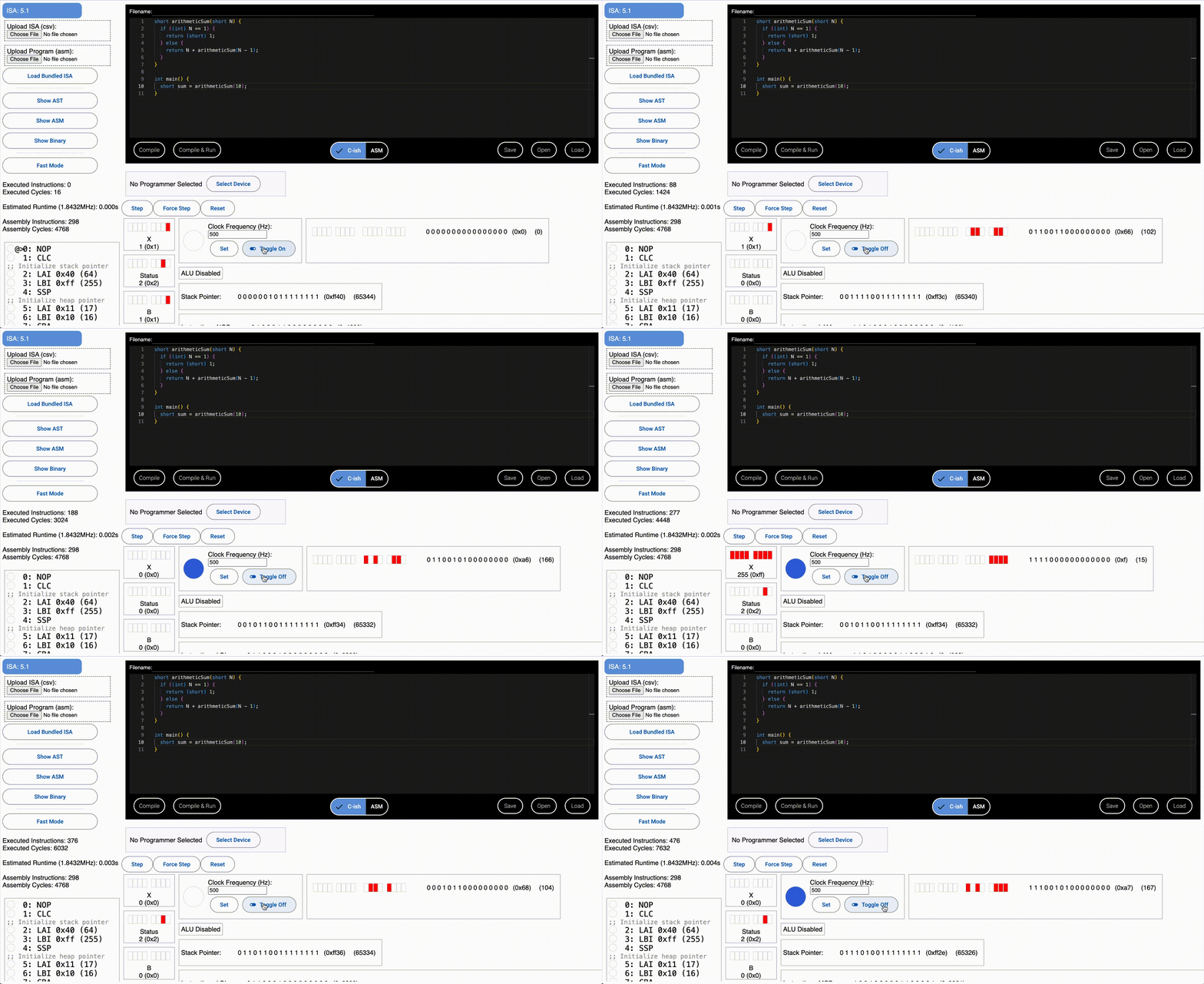
Using the simulator is not that straightforward. It’s not really intended for use by anyone but me! But if you are so inclined you will need to know a couple things about its non-UX friendly operation.
First, you will need to load an ISA. At the time of writing, you will want to use ISA 5.1. At some point I may make it easier to load from a list of ISAs, but for now you’ll have to download and upload that csv.
Once that is uploaded, you should be able to compile programs that you write in the code editor. This code editor has two modes:
- Cish
- Theoputer Assembly
Cish is fairly C-like although some things are missing. It’s implemented as a custom compiler that I wrote for the Theoputer so that people could write C programs and run them on the hardware! It is probably missing some C features, but it does support a lot of things like:
- Structs
- Recursion
- Function calling
- 16bit operations (via
shorttypes) - Pointers
mallocsort of, though that’s technically libc, not C- Standard operators: add, subtract, multiply, divide, modulo, ternary, logical
__asmblocks for inline assembly
If you’re curious about all of the features, and how it was built, head on over the beachhead post about Writing a C Compiler From Scratch.
Theoputer Assembly is really just writing out the opcodes in their short form, just like you would write MIPS or (if you’re hardcore) x86 assembly code. There’s a dedicated page about this assembly language/ISA (Theoputer Assembly), but the C-ish option is probably best unless you’re actually building a Theoputer.
Note: If you are, OMFG! Haha. While I doubt anyone ever will, PLEASE drop me a line if you are crazy enough to try. I’d be happy to support you :).
Running on Hardware
In the extremely unlikely event that you actually have Theoputer hardware (unless that’s you Sean reading this), then you can run programs that you’ve written in the simulator by flashing the Theoputer ROMs directly from the simulator itself.
Load Up an ISA
First you’ll need to flash the microcoder ROM chips with the ISA of your choosing. The microcoder flash utility is the best way to do this. You can upload any ISA, plug in the ROM Programmer, and follow the instructions to write the ISA to the three microcoder ROM chips. There’s even a validator that will read the bytes on the ROM chip back to make sure everything went smoothly.
Once an ISA has been loaded into the microcoders you can go back to the simulator to flash a program to the program ROM chips. For reference purposes, the microcode ROMs are the three large DIPs located at the bottom of the Instruction and Control board:
Flashing the Program ROMs
Under the editor in the simulator is a section that allows you to select a connected device via Web Serial. If you connect a ROM Programmer to one of your USB ports it should show up in the list of devices. It will be named something odd-looking, but should have the name “Arduino” in it since the ROM Programmer uses an Arduino to communicate between USB and the ROM flashing protocol.
This presupposes you’ve already set up the programmer to have the correct Arduino software to communicate to the simulator and perform the correct signaling to the ROM Programmer board. So do that if you haven’t already.
The simulator is smart enough to negotiate with the selected device to determine its capabilities, so it’s unlikely you’ll have to do much from here on apart from follow the instructions. Once you’ve written a program to the two ROM chips (assuming it compiled), you can turn on the Theoputer, hit the reset button, and enjoy!
Special Directives
Since the Theoputer doesn’t (yet) have an operating system, things like I/O and memory management are a little odd and specific. They certainly don’t follow anything resembling POSIX standards! Here are the current special directives:
void pause(): This will translate literally to the instruction HLT causing the computer’s clock to stop running. Because there is an Instruction Stepper on the Theoputer, this is a useful way to debug programs. Simply put thispausestatement where you want to set a “breakpoint”.iowrite(byte): This will write the contents of the A register into the I/O output buffer and output lines. Under the hood this just emits the instruction LQA, which loads into Q (the I/O output register) the contents of register A.byte ioread(): This will read the contents of the I/O data lines and store the result in A. Under the hood this just emits two instructions: LZQ, LAZ. There isn’t a dedicated instruction for directly loading the input data lines into register (like a LAQ), but there’s no reason there couldn’t be.void* malloc(byte size): This is a complex case, but you can call this similar to the libc version except there’s nosizeofoperator (yet) in the Theoputer. If you’re interested in the details, check out the post about how malloc works in the Theoputer.